



- Published on: 2026-10-02 10:09:10
Trading Platform with Advanced Charting Tools: A 2026 Buying Guide

The platform with the longest list of indicators may be the wrong choice for your strategy. A trading platform with advanced charting tools should help you spot the setups you trade and move from analysis to order placement without unnecessary friction. Feature lists can make essential tools and impressive-sounding extras hard to distinguish, especially when charting and execution happen in separate workflows.
Look beyond the number of chart types or indicators. The better fit is the platform that supports your decisions, preferred devices and markets, and the way you place and manage trades. This guide gives you a practical framework for comparing charting capabilities, alerts, drawing tools, execution workflows, and account fit, so you can focus on features that matter to your routine.
You’ll learn how to match tools to a trading approach and assess whether analysis connects smoothly to order entry. If you’re considering TradingPRO, compare its Rookie, Micro, Pro, and Scalp accounts with your requirements, and verify Trade Hub’s current charting capabilities rather than assuming which tools it includes.
Key Takeaways
- Choose chart features that support your decisions, not simply the platform with the longest feature list.
- Use a comparison checklist to assess chart types, indicators, drawing tools, alerts, market data, devices, and order workflow.
- Match a broker-integrated platform or dedicated charting tool to your markets and the way you analyze and execute trades.
- Test layouts, data, and order entry before committing. If the provider offers a demo or practice environment, confirm its availability and use it to check the workflow.
- Assess whether a trading platform with advanced charting tools fits your needs, then verify account terms and any unconfirmed platform features.
What makes a trading platform with advanced charting tools useful?
Advanced charting turns market prices into a visual workspace for applying analysis and planning decisions; it does not determine whether a trade will succeed. A trading platform with advanced charting tools is useful when its charts support a repeatable process, not just display a long menu of features. Chart analysis can inform a decision, but it can’t guarantee accuracy, profit, or lower risk.
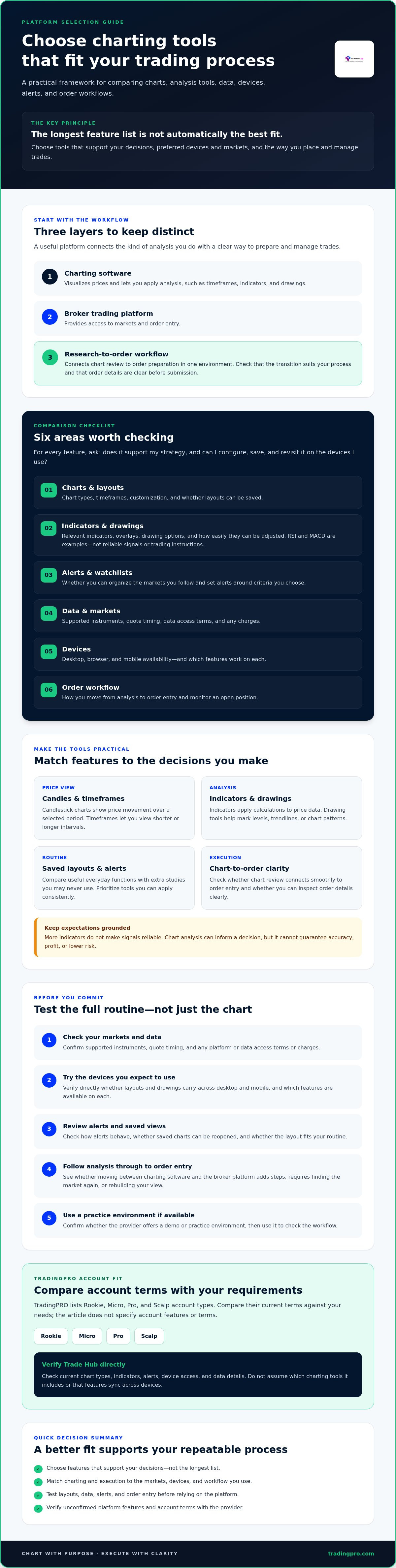
Keep three layers distinct. Charting software focuses on visualizing prices and applying analysis. A broker’s trading platform provides access to markets and order entry. A combined research-to-order workflow connects the two, letting you move from reviewing a chart to preparing an order in one environment. The right fit depends on how you work and which markets you trade, not on a universal ranking.
Which chart features count as advanced?
Candlestick charts show how price moves over a selected period, while timeframes let you view shorter or longer intervals. Drawing tools help mark levels, trendlines, or chart patterns. Indicators apply calculations to price data: RSI and MACD are common examples, but their presence doesn’t make them reliable signals or trading instructions. For background, see this overview of technical analysis.
Prioritize tools that support your actual routine. You may need a few indicators, adjustable timeframes, and clear drawings, but not dozens of specialized studies. Compare practical functions, such as saving layouts and setting alerts, with extras you may never use. Advanced means useful and configurable for your analysis, not simply numerous.
Why does the charting-to-trading workflow matter?
Switching between charting software and a separate broker platform can interrupt your process. You may need to find the same market again, recheck the price, or rebuild your view before placing an order. An integrated workflow can reduce these steps, but it still needs to suit your process. Check how chart review connects to order entry and whether you can inspect order details clearly before submitting.
Test the workflow on the devices you expect to use. Confirm directly whether layouts and drawings carry across desktop and mobile, whether saved charts can be reopened, and how alerts behave. Don’t assume features sync simply because a provider offers access on multiple devices.
If you’re building foundational market knowledge, start with this forex trading beginner’s guide. To research TradingPRO’s tools, review its Trade Hub page and verify current chart types, indicators, alerts, device access, and data details before relying on them.
Which charting tools should you compare before choosing a platform?
Compare platforms against the decisions you need to make, not the size of their feature menus. A useful checklist covers the chart itself, analysis tools, market data, device compatibility, and the path from a chart to an order. For each item, ask whether it supports your strategy and whether you can configure, save, and revisit your layouts on the devices you use.
| Area | What to check |
|---|---|
| Charts | Chart types, timeframes, and whether you can customize and save layouts. |
| Indicators and drawings | Relevant indicators, overlays, drawing tools, and how easily you can adjust them. |
| Alerts and watchlists | Whether you can organize markets and set alerts around criteria you choose. |
| Data and markets | Supported instruments, quote timing, and any data access terms or charges. |
| Devices | Availability on desktop, browser, and mobile, plus which features work on each. |
| Order workflow | How you move from analysis to order entry and monitor an open position. |
Which technical analysis and alert features do you need?
Start with the tools you understand and use. Compare indicator selection, chart overlays, drawing options, and whether watchlists or alerts help you track the markets you follow. A smaller toolkit can be easier to apply consistently than a crowded interface. No indicator predicts future prices or guarantees a successful trade, so judge features by how well they support your analysis, not by their presence alone.
How should you compare devices, data, and execution?
Test each workflow on your preferred devices rather than assuming the mobile version matches desktop. Check market coverage and quote timing with the provider, and review any platform or data charges that may apply. Then follow the full sequence: open a chart, locate the relevant instrument, prepare an order, and find where you would monitor it. Chart quality matters, but so does a clear route to execution.
Use the checklist to compare a trading platform with advanced charting tools against your actual routine. TradingPRO offers Rookie, Micro, Pro, and Scalp accounts, but verify its current charting features and account-specific platform details before drawing conclusions. If it remains on your shortlist, review the terms and details through the TradingPRO registration page before deciding whether it fits.
How do advanced charting platforms compare for different trading styles?
The right setup depends on your process. A broker-integrated platform combines chart review with access to order entry, which can reduce app-switching. A dedicated charting tool may offer a separate analysis workspace, but you’ll need to confirm whether it connects to your broker or whether you must place trades elsewhere. In either case, check that your markets and instruments are supported, that data timing meets your needs, and that access terms are clear.
Style changes what matters most. A short-term trader may prioritize quick timeframe navigation and visible order controls; a swing trader may value reusable multi-timeframe layouts; a longer-term trader may rely more on watchlists and research access. No single trading platform with advanced charting tools is best for everyone. Match the features to your routine, then verify the workflow on the devices you intend to use.
What should short-term traders look for?
For a fast-paced workflow, test how easily you can change charts and timeframes, set relevant alerts, and access order entry. A complex layout can add friction if it hides the information you need. Keep the workspace focused, and verify execution and data details directly with the provider. For more on evaluating this kind of setup, see our scalping infrastructure guide.
What changes for swing and longer-term analysis?
With decisions spread over longer periods, saved layouts and watchlists may help you review markets consistently across sessions. Multiple timeframes can support broader context, while research access may matter alongside chart tools. Constant alerts may be less useful if you don’t need to monitor every price move. Choose notifications that fit your review schedule instead of enabling them all.
Build your comparison around a documented process: what you review, how often you check it, and what information you need before placing or managing an order. Don’t copy another trader’s setup by default. Test whether your preferred layout is easy to revisit and whether the platform covers the markets and devices you rely on. The strongest fit is the one that supports your decisions without adding unnecessary steps.
How can you test a charting platform before committing?
Judge a platform by completing real tasks, not by browsing screenshots or feature lists. First, write down the markets you want to follow, the chart tools you rely on, the devices you use, and how you expect to place and monitor trades. If the provider offers a demo or practice environment, check its availability and use it to test the workflow before committing. Confirm whether its tools and market data match those available under the account you’re considering.
What tasks should you test in a platform?
Run the same short checklist on each platform. Build a watchlist, open one of your preferred markets, change timeframes, add an indicator, and save a chart layout. Then reopen the layout, set an alert if available, and repeat the tasks on your other preferred devices.
Trace the path from chart analysis to order entry and position monitoring. Note every extra login, repeated search, unclear step, or missing feature. These friction points reveal more than a polished demonstration. Also check quote timing and market coverage while testing, since availability may differ by instrument, device, or account.
Which account and risk details deserve a closer look?
Before choosing, review the provider’s current account terms directly. Check which instruments are eligible, what trading conditions and fees apply, and whether features or data access vary by account. Confirm the legal entity and regulatory information relevant to your location, along with local eligibility rules. Don’t assume terms shown for one region or account apply to another.
TradingPRO offers a Rookie Account. Its account page is a place to review available details, not confirmation of specific charting features. Verify the current terms and platform tools independently before deciding whether it fits your requirements.
- Record what works: note whether charts, saved layouts, alerts, and order access support your routine.
- Record what doesn’t: flag missing markets, device limitations, confusing steps, or unclear data terms.
Practice results aren’t evidence of future returns. Leveraged trading carries a high level of risk, and a smooth interface can’t remove that risk. Compare your notes against your requirements before committing. If TradingPRO matches your account criteria after you’ve checked the relevant terms, review registration options.
How to assess TradingPRO alongside your charting requirements
TradingPRO offers Rookie, Micro, Pro, and Scalp accounts, as well as social and copy trading. These offerings are a starting point for comparing account fit, not evidence of particular charting tools or a specific analysis-to-order workflow. Assess the brokerage against the checklist you built, and verify each feature before relying on it.
What should you verify about TradingPRO's tools and accounts?
Review the TradingPRO Trade Hub details directly. Confirm which chart types, indicators, drawing tools, alerts, data access, and devices are currently supported. Check the markets available to you as well. These details can change, and the available information doesn’t confirm specific charting functions or device compatibility.
Then compare the available tools and trading conditions across the account tier you’re considering. Verify whether features, eligible instruments, or terms differ by account and location. Before making a decision, review the applicable regional entity, eligibility requirements, and risk disclosures. Don’t assume a feature or condition listed for one account or region applies to another.
What is a sensible next step if the fit checks out?
Separate your checklist into must-haves and optional features. For example, a saved chart layout or access to a market you trade might be essential, while an indicator you rarely use may be optional. Compare each item with details you’ve confirmed, and note anything that remains unclear. If the analysis-to-order workflow matters to your approach, make sure you understand how chart review connects to order entry and trade management before deciding.
Finally, review the account information and risk terms that apply to your circumstances. Charting features can support analysis, but they can’t guarantee a trading outcome or remove the risks of trading. Registration should come after you’ve assessed suitability, confirmed the details, and decided the account terms fit your needs.
If your checks support moving forward, Explore registration options.
Choose the platform that fits your process
The right trading platform with advanced charting tools supports your analysis and connects smoothly to the way you place and manage trades. Compare practical needs first: chart features, market data, device access, and order workflow. Then test those tasks directly and check account terms before deciding. A long list of tools matters less than a setup you understand and can use consistently.
TradingPRO offers Rookie, Micro, Pro, and Scalp accounts, along with social trading and copy trading. Treat those offerings as starting points for evaluating account fit, and verify current charting capabilities, supported markets, and account conditions before relying on them. Charting can inform your decisions, but it can’t guarantee results or remove trading risk.
Once you’ve checked the details and assessed suitability, Compare your requirements and explore registration options. Make your choice with a clear checklist and a process that works for you.
Frequently Asked Questions
What features should an advanced trading platform have?
An advanced trading platform should provide the tools you need to analyze markets and manage your workflow. Compare chart types and timeframes, technical indicators, drawing tools, watchlists, alerts, market data, and order access. Also check whether you can save chart layouts and use them on your preferred devices. The best feature set is the one that supports your strategy; a longer list isn’t automatically more useful.
Which trading platform has the best charting tools?
There isn’t one best platform for every trader. The right choice depends on your markets, analysis routine, preferred devices, and how you place and manage orders. Compare broker-integrated charting with dedicated charting software, then test the workflow using tasks you actually perform. Check supported instruments, data timing, platform or data charges, and whether essential features are available under the account you’d use.
Can I use advanced charting tools on a mobile trading platform?
Some trading platforms offer charting on mobile, but available tools can differ from their desktop or browser versions. Check whether your preferred chart types, indicators, drawing tools, alerts, and saved layouts work on the mobile app. Test how easily you can move from chart analysis to order entry and monitor a position. Confirm device compatibility directly with the provider instead of assuming features carry across.
Are advanced charting tools useful for beginner traders?
They can help beginners visualize price movement and explore concepts such as timeframes, chart patterns, and indicators. Start with a small set of tools you understand, and learn what each one shows before adding more. Indicators don’t predict prices with certainty or provide instructions that fit every situation. Beginners should also understand the risks of trading and avoid treating chart signals as guarantees of a particular result.
What is the difference between charting software and a trading platform?
Charting software focuses on displaying market prices and supporting analysis with features such as indicators and drawing tools. A broker’s trading platform provides access to trading instruments and order entry. Some platforms combine chart analysis and trading in one workflow, while others require separate tools. Check whether a charting tool connects to your broker, what markets and data it covers, and how you’ll place and monitor orders.
Can TradingPRO's Trade Hub provide the charting tools I need?
That depends on Trade Hub’s current capabilities and your requirements. Review Trade Hub directly to confirm which chart types, indicators, drawing tools, alerts, data timing, and device access are available. Also verify supported markets and which features apply to your location and account. Compare confirmed details with your must-have checklist before deciding whether it fits.
Do advanced charting tools guarantee better trading results?
No. Charting tools can help you examine price movement and organize analysis, but they can’t guarantee accuracy, profits, or lower risk. An indicator or alert is a feature, not a promise about what prices will do next. Use tools as part of a considered process, and understand that trading carries risk. Practice results also don’t prove how a strategy will perform in live conditions.


