




- Published on: 2026-09-21 16:44:14
Reducing Latency with a Trading VPS: The 2026 Speed & Execution Guide

A blazing-fast gigabit fiber connection at home won't save your trades from negative slippage. Watching an automated Expert Advisor miss a clean fill during high-impact news spikes is maddening. You've likely questioned whether a dedicated server actually eliminates execution drag or if it's merely another trading overhead. The reality is uncompromising: order velocity is dictated by physical distance and routing efficiency, not your domestic download speed. When fractions of a pip decide profitability, reducing latency with a trading VPS becomes the definitive structural upgrade for any serious trader.
Deploying a trading VPS positions your execution terminal directly adjacent to tier-one liquidity hubs like Equinix LD4 and NY4, driving network transit times down to a razor-thin sub-5ms threshold. You eliminate home broadband dropouts, conquer execution slippage, and ensure automated scalping and copy trading strategies execute without friction. This comprehensive guide uncovers the technical mechanics of institutional routing, clarifies critical server specifications, and shows you exactly how to configure the optimal execution infrastructure for your trading.
Key Takeaways
- Master the structural difference between terminal access ping and true matching engine execution to pinpoint where trade profits are lost to latency drag.
- Discover how reducing latency with a trading VPS positioned inside premier financial data hubs like Equinix LD4 and NY4 slashes round-trip network hops.
- Identify the optimal hardware benchmarks, focusing on single-thread CPU clock speeds and NVMe storage, that prevent automated Expert Advisors from throttling.
- Apply a step-by-step diagnostic protocol using terminal logs and targeted traceroutes to expose network bottlenecks before deploying live capital.
- Unify low-latency hosting with institutional-grade routing environments like the TradingPRO Scalp Account to secure rapid, reliable execution for scalping and copy trading.
What Is Latency in Trading and Why Does It Drain Capital?
Trade latency represents the entire timeline between trade signal generation and final order confirmation. Every market order embarks on a physical journey: your trading terminal processes the logic, dispatches packets across public internet infrastructure, waits for broker matching engine validation, and receives execution clearance. When markets surge, mere fractions of a second decide whether you capture profit or absorb an unfavorable entry. This makes reducing latency with a trading VPS the baseline prerequisite for systematic trading.
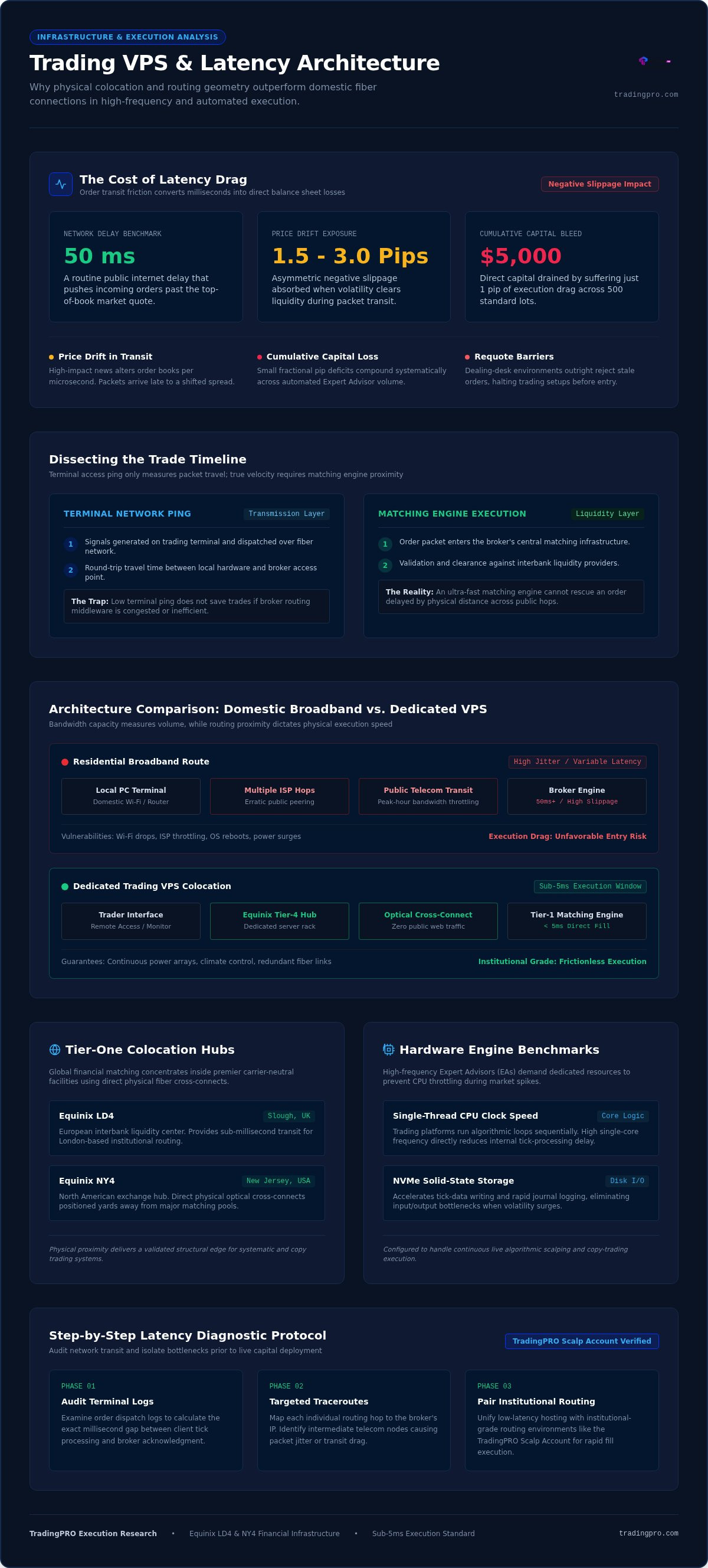
Domestic gigabit fiber gives you high bandwidth, but bandwidth only dictates how much data you move, not how fast a single packet travels. Your order still navigates dozens of intermediate telecom routing hops. In volatile conditions, a routine 50ms delay easily pushes execution past the top-of-book quote, yielding 1.5 to 3.0 pips of negative slippage. For high-frequency scalpers and algorithmic strategies, that friction destroys an otherwise profitable statistical edge.
The Mechanics of Slippage and Delayed Fills
Slippage occurs when the execution price differs from your requested quote. While positive slippage works in your favor, fast-moving markets frequently produce asymmetric negative slippage. As your trade packets travel across public fiber, incoming institutional volume clears available liquidity at your target level.
- Price drift in transit: Volatile news updates the order book every microsecond. Orders caught in transit arrive late to an altered book.
- Cumulative capital bleed: Suffering just a 1-pip execution drag across 500 standard lots drains $5,000 directly from your bottom line.
- Requote barriers: Dealing-desk environments outright reject stale orders, halting automated setups before they launch.
Network Ping vs. Broker Execution Latency
Traders often conflate terminal ping with actual execution velocity. Network ping represents simple round-trip packet travel between your machine and the broker's access point. Execution latency, conversely, measures how long the broker's internal engine takes to match and fill that order against liquidity providers.
A low terminal ping means nothing if your broker relies on inefficient bridging middleware. Conversely, an ultra-fast matching engine cannot rescue an order delayed by thousands of miles of physical distance. Reducing latency with a trading VPS solves the critical transmission half of this equation, placing your terminal directly on the doorstep of tier-one matching engines.
How a Trading VPS Optimizes Trade Routing and Execution Speeds
A dedicated Virtual Private Server (VPS) is not just a remote machine running in the cloud. It is an isolated, high-performance computing partition architected specifically to sit alongside institutional market infrastructure. Instead of routing trade packets through unpredictable public lines, reducing latency with a trading VPS locks your execution terminal onto dedicated enterprise backbones. You gain predictable routing, dedicated system resources, and total independence from domestic network crashes.
The Anatomy of Colocation in Financial Data Centers
Proximity defines execution speed. Global financial markets concentrate their matching infrastructure inside premier carrier-neutral hubs, most notably Equinix LD4 in Slough and Equinix NY4 in New Jersey. Deploying a VPS inside these facilities places your execution terminal just yards away from major broker servers and interbank liquidity pools.
These environments rely on physical optical fiber cross-connects running directly between server racks. This architecture bypasses public web traffic completely, slashing transmission latency to sub-millisecond ranges. As detailed in a Securities and Exchange Commission review on co-location and trading speed, physical proximity provides algorithmic systems with a structural execution edge. Enterprise tier-4 facilities guarantee continuous power arrays, climate control, and redundant fiber links to preserve that connection without fail.
Home Broadband vs. Dedicated Trading VPS Infrastructure
Residential broadband connections prioritize passive media streaming over packet velocity. Public ISPs route data across multiple erratic peering nodes, resulting in variable packet jitter and evening bandwidth throttling. An unexpected domestic power surge, local Wi-Fi drop, or automatic operating system reboot freezes your trading terminal, stranding automated trade logic mid-execution.
A dedicated trading server completely rewires this dynamic:
- Dedicated hardware silicon: High single-thread clock frequencies and fast NVMe storage process rapid price ticks without thread bottlenecks.
- Carrier-grade network integrity: Enterprise routing lines deliver zero packet loss between the client terminal and broker matching engines.
- Continuous execution uptime: Automated Expert Advisors and copy trading profiles operate 24/7 without interruption.
Traders who create a live trading account can pair their algorithmic strategies directly with these low-latency hosting setups to ensure trades enter the market exactly as intended.
A Step-by-Step Diagnostic Protocol to Audit Your Trading Latency
Before committing capital to hosting upgrades, quantify your exact network inefficiencies. Guessing where delays occur leads to wasted infrastructure spend. Establishing baseline metrics isolates whether execution friction stems from local equipment, transit peering hops, or broker matching architecture. Follow this four-stage audit to pinpoint latency bottlenecks with forensic precision.
- Record baseline access latency: Note the ping displayed in your terminal's lower status bar across European, US, and Asian market opens.
- Isolate intermediate transit hops: Execute targeted network traces to track where packets route through public backbones.
- Audit platform execution journals: Inspect timestamped transaction logs to extract true fill delays.
- Stress-test packet jitter: Measure ping stability during high-impact news releases using synthetic command-line load tests.
Executing this diagnostic workflow reveals whether reducing latency with a trading VPS is necessary to preserve your algorithmic edge.
Isolating Network Hops Using Command Line Tracing
Terminal connection indicators show aggregate latency, but command-line network tracing reveals every routing detour along the path. Extract your broker's trade server IP address from your platform configuration files. Open Windows PowerShell or Command Prompt, then run tracert [Broker_IP].
Examine the intermediate network hops. A clean routing path requires fewer than 10 to 12 hops. If your trace shows 25 to 30 intermediate nodes, or if packets detour through distant continents before returning to a European hub, your ISP is degrading execution velocity. Repeated request timeouts indicate unstable peering exchanges that produce order freezes during elevated market volume.
Auditing Platform Execution Logs for True Fill Times
True execution speed hides inside your platform's operational journals. In MetaTrader, open the Journal and Experts tabs immediately after order execution. Locate the entry string confirming your transaction, which displays a return metric structured like order #... executed in XX.XX ms.
Calculate the delta between the initial dispatch timestamp and final order fill confirmation. If your network ping measures 5ms but the total fill requires 280ms, the constraint lies inside your broker's liquidity bridging or execution venue. If your fill matches the access ping closely, transmission travel accounts for the bulk of the delay. In the latter scenario, reducing latency with a trading VPS collapses that transmission window down to single-digit milliseconds.
Selecting and Configuring the Optimal VPS for Scalping and Algos
Hardware bottlenecks silently erode execution speed even inside premier data hubs. Renting an underpowered virtual machine introduces CPU thread saturation, delaying trade triggers before packets ever hit the network card. Maximizing your return on reducing latency with a trading VPS requires matching server specifications directly to your algorithmic computational workload.
Hardware Specifications: What Actually Matters for Speed
Do not fall for high core counts running at sluggish base speeds. Most retail trading terminals execute their charting logic, Expert Advisors, and trade dispatches on a single primary processing thread. Prioritize high single-core CPU clock frequencies above 4.0 GHz rather than buying excessive virtualization cores.
Memory and disk architecture dictate tick responsiveness:
- System RAM allocation: Provision at least 2 GB to 4 GB of dedicated RAM per live terminal instance to eliminate memory swap delays.
- NVMe solid-state storage: Standard SATA drives bottleneck during market openings. NVMe arrays allow instantaneous local caching of massive tick volume.
- Static IPv4 addressing: Retain a clean, dedicated static IP to ensure compliance with institutional risk engines and proprietary trading rules.
Optimizing the VPS Operating System for Peak Execution
Standard Windows Server installations run dozens of background tasks that steal compute cycles. Strip your operating system down to bare execution essentials. Disable Windows visual enhancements, turn off scheduled indexing services, and set active Windows Update policies to prevent unannounced server reboots during market hours.
Remote Desktop Protocol (RDP) sessions require strict configuration. Modify group policies so disconnecting an RDP window leaves user sessions and terminal processes running actively in the background. Place terminal executable shortcuts in the Windows Startup folder to guarantee automated recovery if the host node restarts.
Safeguarding Automated Strategies and Trade Copiers
For traders executing social trading and copy trading strategies, network throughput between master accounts and sub-accounts is non-negotiable. Transmission latency between the provider terminal and the receiver terminal compounds execution slippage, transforming winning strategies into losing positions. Reviewing the best trading infrastructure for scalping helps you structure these multi-terminal environments correctly.
Aligning your automated algos with proximity-hosted infrastructure protects every signal generated by your model. Open a live trading account to deploy your algorithmic strategies on institutional-grade infrastructure built for speed.
Maximizing Execution Edge: Pairing Your VPS with High-Speed Accounts
Shaving transmission time down to sub-5ms accomplishes little if your broker queues orders inside a slow execution desk. High-performance hosting solves the transit bottleneck, but matching engines dictate final execution quality. When your VPS delivers trade packets instantly, the receiving brokerage environment must clear them with equal speed. Complete execution mastery requires combining proximity hosting with institutional liquidity bridging and raw spread pricing.
Pairing low network latency with widened retail markups destroys your statistical edge. Reducing latency with a trading VPS functions at its highest potential only when connected to tier-one pricing streams that eliminate artificial order processing delays.
The Synergy of Pro-Tier Execution and Sub-5ms Ping
Fast networks demand raw market access. When an Expert Advisor scalps micro-moves, standard dealing-desk accounts re-introduce delay through artificial dealer plug-ins or manual trade confirmations. Premium account tiers eliminate this drag by routing tickets directly to interbank liquidity providers.
Traders capture maximum velocity using the TradingPRO Scalp Account, which pairs raw spreads with rapid direct execution. Deep institutional liquidity pools absorb substantial ticket sizes without triggering adverse price gaps during high-impact economic releases. Orders dispatched across cross-connect lines meet immediate book depth, ensuring fills at the exact price your algorithmic models calculated.
Protecting Capital and Scaling Execution Performance
Institutional execution demands continuous monitoring. You need empirical data confirming that your hosting setup and broker engine remain synchronized across shifting market sessions.
- Systematic metric auditing: Deploy the TradingPRO Trade Hub to track trade performance, exposure levels, and real-time execution statistics across your portfolio.
- Multi-tier infrastructure: Match trading styles to specialized accounts, leveraging Rookie, Micro, or Pro accounts for discretionary positions, while deploying the Scalp Account for rapid automated systems.
- Synchronized copy execution: Protect social trading and copy trading strategies by eliminating network jitter between signal masters and follower terminals.
Achieving structural execution speed is not a theoretical luxury; it directly protects your trading capital against market friction. Take full command of your execution environment and create a live trading account to deploy your strategies with institutional speed.
Lock in Your Execution Edge for 2026 and Beyond
In modern financial markets, execution velocity is the ultimate separator between capturing profitable entries and absorbing costly slippage. Physical proximity to primary liquidity hubs slashes packet transit times, while dedicated single-thread processing prevents automated Expert Advisors from throttling during rapid price spikes. Reducing latency with a trading VPS transforms your trading terminal into an institutional-grade workstation built for peak performance.
Maximized execution demands equal power on both sides of the cable. Pair your proximity hosting with sub-millisecond order routing and analyze your execution metrics using the advanced Trade Hub analytical suite. Whether you run automated scalping robots or mirror trades across accounts, institutional stability protects your capital against volatile market friction. Stop leaving fills to chance. Take total command of your trading speed and deploy your high-speed strategy on a TradingPRO Scalp Account today.
Frequently Asked Questions
How much latency reduction can I realistically expect from a trading VPS?
Expect a reduction from standard residential speeds of 30ms to 100ms down to sub-5ms, with direct financial colocation reaching sub-millisecond execution. If you trade across continents from home, latency can easily exceed 200ms. By placing your terminal in the same data center as your broker's trade engine, reducing latency with a trading VPS strips out nearly all transit hops and network jitter.
Does an ultra-low latency VPS completely eliminate execution slippage?
No, a VPS cannot eliminate slippage caused by severe market volatility or empty order books. It does, however, eliminate network-induced latency slippage. When an order reaches the broker in 1ms instead of 60ms, the price is far less likely to move before matching. Pairing your server with an institutional venue like the TradingPRO Scalp Account ensures deep liquidity pools absorb orders cleanly.
Is a trading VPS necessary if I only execute manual swing trades?
A dedicated trading VPS isn't strictly necessary for manual swing traders who hold positions over days or weeks. Swing strategies tolerate 100ms entry variances without compromising risk-to-reward ratios. However, a VPS still delivers substantial value if you run automated trade copiers, use client-side trailing stops, or want continuous terminal access from mobile devices without keeping home hardware powered on.
Where should my trading VPS be physically located?
Position your VPS in the specific data center hosting your broker's matching engine, not near your home address. The world's primary retail and institutional hubs are Equinix LD4 in London and Equinix NY4 in New Jersey. Always check your broker terminal server access logs to confirm whether their servers reside in London, New York, Tokyo, or Singapore before provisioning a machine.
Can I run multiple trading platforms and Expert Advisors on a single VPS?
Yes, you can run multiple platform instances simultaneously if your VPS hardware provides sufficient compute resources. Allocate roughly 2 GB to 4 GB of dedicated RAM and an unshared CPU core for every terminal running high-frequency algorithms. This ensures smooth operations across distinct accounts, whether you're running automated algos on a Scalp Account or tracking positions across Rookie and Pro accounts.
What happens to my automated trades if my personal home computer shuts down?
Your automated trades continue executing without interruption. Once deployed on the server, Expert Advisors and copy trading engines live inside the data center's 24/7 operating environment. Your home computer acts only as a temporary remote viewing screen. When your local device loses power, disconnects from Wi-Fi, or shuts down, the VPS maintains active market connections and processes signals seamlessly.
How do I test my connection speed between the VPS and my broker server?
Check the access ping displayed in the bottom-right corner of your trading terminal, then run a command-line traceroute directly to your broker's server IP. For true round-trip execution verification, inspect the platform Journal tab immediately following a live fill. Reducing latency with a trading VPS becomes evident when logs confirm total dispatch-to-execution processing times dropping under 5ms.


