




- Published on: 2026-10-02 08:22:30
One-Click Trading Setup: A Practical Guide for 2026

One-click trading removes steps from order entry, not risk from the market. A careful one-click trading setup can help you submit orders efficiently, but a misclick can send an order before you’ve checked its instrument, direction, volume, or type. Fewer clicks don’t guarantee faster execution, a particular price, or profit.
Platform settings and order controls vary, so there’s no single menu path that applies everywhere. Before enabling faster entry, learn what each control does and which order details the platform carries forward by default.
This guide explains how one-click order entry works, what to review before placing a live order, and how to configure and test your preferences. It also covers how to choose a workflow that fits your experience and trading habits. TradingPRO offers four account tiers: Rookie, Micro, Pro, and Scalp. Its Social Trading and Copy Trading features are also part of the brokerage offering. Move quickly only when it makes sense, and keep every order deliberate.
Key Takeaways
- A one-click trading setup streamlines order entry, but doesn’t guarantee faster execution, a specific price, or profit.
- Use a platform-neutral setup process: find order-entry preferences, read the on-screen explanations, and test your settings carefully.
- Compare rapid entry with a standard order ticket to decide how much review time your workflow needs.
- Before submitting an order, check the instrument, direction, order type, volume, and intended risk controls.
- Match your workflow to your experience and trading habits, then compare TradingPRO’s Rookie, Micro, Pro, and Scalp account tiers.
What one-click trading setup changes when you place an order
A one-click trading setup changes how you submit an order. Depending on the platform’s settings, you can send an order with fewer confirmation steps instead of entering and reviewing every detail in a separate ticket. The feature is part of an electronic trading platform, but its design depends on the software and account interface you use.
One-click describes order entry, not how quickly the market processes an order. Its handling and fill can depend on the order type and market conditions. Fewer actions don’t promise a faster fill, a particular price, or a better trading result.
How one-click order entry differs from a standard ticket
A standard ticket typically gives you a dedicated review step: select an instrument, choose a direction, enter volume and other available terms, then submit. A streamlined workflow may let you set some details in advance or enter them from a chart or quote panel. The interface may still ask you to confirm, or it may submit immediately. Before using it, find out what the final action does and which details are already selected.
What the feature does not do
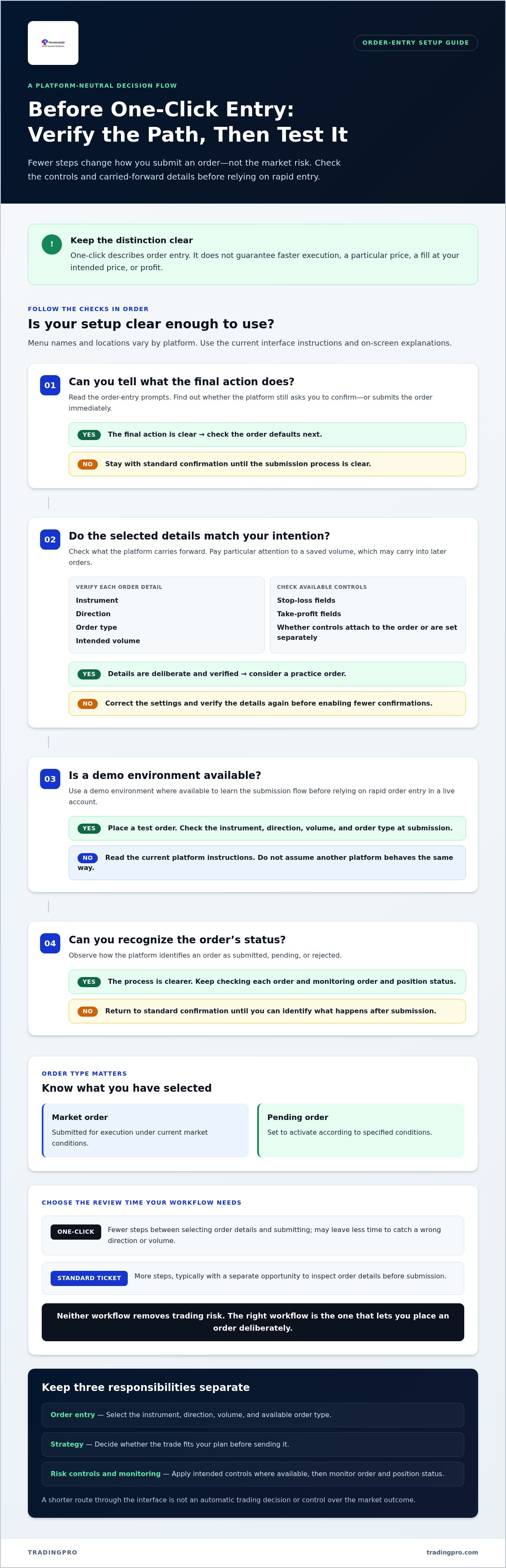
Removing a confirmation step doesn’t remove market risk, make an order more likely to fill at your intended price, or choose a strategy for you. Keep these responsibilities separate:
- Order entry: Select the instrument, direction, volume, and order type available in the interface.
- Strategy: Decide whether the trade fits your plan before sending it.
- Risk controls and monitoring: Apply your intended controls where available, then monitor the order and position status.
Think of one-click entry as a shorter route through the interface, not an automatic trading decision. Know which details are preselected, what action submits the order, and where to review its status. That clarity helps you use a streamlined workflow without confusing convenience with control over the market outcome.
How to complete a one-click trading setup step by step
Set up your workflow before enabling rapid submission. Menu names and locations vary by platform, so use this as a general sequence rather than a universal set of button names. Read the current instructions and on-screen explanations before changing order-entry preferences.
Prepare the order settings before enabling faster entry
Start with the instrument you intend to trade and the order types available for it. A market order and a pending order work differently: a market order is submitted for execution under current market conditions, while a pending order is set to activate according to specified conditions. Check which type the interface has selected before proceeding.
Next, check the direction and volume. Pay particular attention to the default volume, since a saved value may carry into later orders. Set it deliberately and verify it before enabling any option that reduces confirmation steps. If the platform provides stop-loss or take-profit fields, check whether those controls are attached to the order or need to be set separately.
Test the setup before placing a live order
Where a demo environment is available, use it to learn the submission flow before trading in a live account. Test your settings in a demo environment before relying on rapid order entry in a live account. Check how the instrument, direction, volume, and order type appear at submission. Don’t assume another platform will behave the same way.
Follow a platform-neutral setup sequence
- Find order-entry preferences. Look for the platform’s trading or order settings. Menu names and locations depend on the interface.
- Read the prompts. Check what enabling one-click entry changes, including whether the platform still asks you to confirm.
- Set and verify defaults. Confirm the instrument, direction, order type, and intended volume. Review available risk-control fields.
- Practice and observe. In demo mode where available, place a test order and note how the platform identifies an order as submitted, pending, or rejected.
- Reassess the workflow. If you can’t tell what action will submit an order, return to standard confirmation until the process is clear.
Platform instructions can change as software is updated. Use guidance for your current version rather than relying on screenshots or menu paths from another platform. A methodical one-click trading setup makes each action predictable before it streamlines order entry.
If you’re comparing brokerage account options, review TradingPRO account registration as a next step.
One-click trading vs. a standard order ticket: which workflow fits?
The right workflow is the one that lets you place an order deliberately. One-click entry reduces steps, while a standard ticket usually gives you a separate opportunity to review order details before submission. Neither approach removes trading risk. Use this comparison to weigh speed against the checks you want to make.
| Consideration | One-click entry | Standard order ticket |
|---|---|---|
| Speed | Fewer steps between selecting order details and submitting. | More steps, including a separate review or confirmation stage. |
| Review opportunities | May leave less time to catch a wrong direction or volume. | Typically lets you inspect details before submission. |
| Ease of use | Can feel efficient once settings and interface are familiar. | Can be easier to follow when you want to enter details one at a time. |
| Error-control habits | Requires consistent checks of defaults and selections before acting. | Use the ticket’s review step to verify the order, but don’t rely on it alone. |
When streamlined entry may suit a trader
One-click entry may suit an experienced trader who follows a familiar routine, uses known instruments and order sizes, and understands how the interface submits orders. Familiarity matters more than speed alone. If your instruments or order parameters change often, a shorter workflow may not suit you. Rapid entry isn’t essential for every trading style.
When a confirmation step may be more useful
A standard ticket can help newer users slow down and check direction, volume, and order type before placing an order. That review can also be useful when market conditions are volatile or a trade differs from your usual plan. Deliberate checks don’t eliminate risk, but they can help you catch an input mistake before submission.
Accidental-order risk is a real trade-off, not a reason to assume one workflow is always safer. Careful defaults and a repeatable pre-submit check can reduce the chance of mistakes, but they can’t eliminate it. If you’re unsure what a control will do, choose the standard ticket until the process is clear.
A pre-trade checklist for safer one-click trading
A streamlined workflow needs consistent checks. Make this checklist part of your routine before relying on rapid order entry, then repeat it before each order. The interface may differ, but the details to review remain the same.
Check the order details every time
- Instrument: Confirm the selected market or asset matches your plan. Similar names or nearby items on screen can be easy to misread.
- Direction: Verify whether you’re buying or selling. Checking order direction and volume before submission is a practical error-control habit.
- Order type: Confirm that you’ve selected the intended type, such as a market or pending order, and understand how it’s set to enter the market.
- Volume: Check the quantity against your plan and risk limits. Don’t assume a saved default is appropriate for every trade.
- Risk controls: Review stop-loss or other protective settings if they form part of your strategy and are available for that order.
Set personal guardrails around faster execution
Decide in advance when you’ll use rapid entry and when you’ll slow down. A familiar, repeatable order may fit your streamlined routine. An unfamiliar instrument, changed volume, or trade outside your usual plan calls for a fuller review. Avoid changing default volume in a fast-moving moment without stopping to verify the new value.
Know how to pause the workflow. If the platform allows it, disable one-click submission or switch to a standard ticket whenever you’re unsure about a setting or selection. Learn where that control is and how to confirm your preferred order-entry mode.
Keep a brief record of order-entry mistakes or near misses. Note what happened, such as selecting the wrong direction or overlooking a default quantity, then update your checklist or settings to address the cause. The goal is a repeatable process, not reliance on memory under pressure.
Use this checklist to see whether your one-click trading setup supports deliberate decisions. If you’re exploring a brokerage account for your trading workflow, view TradingPRO account registration.
Choose a TradingPRO account and trading workflow that fit your next step
Your order-entry method and account choice should support the same trading plan. If you’re learning how orders work or prefer to review each detail before submission, keep that deliberate process in place as you compare accounts. A one-click trading setup is a platform-level choice. It shouldn’t determine your strategy or push you into a workflow you can’t confidently manage.
Match account choice to experience and trading habits
Compare account options against your experience, preferred markets, and trading approach. Consider how often you trade, how much review time you want before submitting an order, and which account details matter to your plan. Don’t choose based on speed alone. A familiar, repeatable routine may support streamlined entry, while a developing process may benefit from the structure of a standard order ticket.
TradingPRO offers four distinct account tiers: Rookie, Micro, Pro, and Scalp, designed for different trader profiles and experience levels. Review the Rookie Account details as you consider which account and order-review habits fit your next step. Build your knowledge at your own pace, and understand your trading approach before changing how you submit orders.
Take a measured next step with TradingPRO
TradingPRO’s brokerage offering also includes Social Trading and Copy Trading, which let clients copy experienced market participants’ trades. Consider how these features fit your broader approach, alongside your account choice and the amount of independent review you want in your routine. They don’t remove the need to understand the orders and risks involved.
Keep the decision practical: choose an account tier that aligns with your experience and trading habits, then use the order-entry workflow that gives you the right level of control. You can register with TradingPRO to explore your account options. Stay deliberate, build familiarity, and streamline order entry only when you’re comfortable with the process.
Make your next order-entry decision with confidence
A sound one-click trading setup starts with understanding what your platform changes and checking its controls before relying on faster entry. Review the instrument, direction, order type, volume, and intended risk controls before submitting. Test the workflow in a demo environment where available, and use a standard ticket whenever you want more time to review.
Choose a process that fits your experience and trading habits, not speed for its own sake. TradingPRO offers four account tiers for different trader profiles and experience levels, along with Social Trading and Copy Trading. Compare these options as you explore a brokerage workflow that aligns with your next step.
Ready to explore TradingPRO? Register with TradingPRO and take a measured step toward a more deliberate trading routine. Keep your checks consistent and build confidence one considered decision at a time.
Frequently Asked Questions
What is one-click trading?
One-click trading is an order-entry method that reduces the confirmation steps needed to submit an order. You still choose the instrument, direction, and order details, though the controls and submission flow depend on the platform. Fewer clicks don’t guarantee a faster fill, a better price, or a profitable result. They change how you enter an order, not the market conditions or decisions that shape its outcome.
How do I set up one-click trading?
To set up one-click trading, open your platform’s trading preferences, read its explanation of the feature, review your order defaults, and enable it only if the workflow suits you. Interface labels and steps vary, so follow the current instructions for your platform rather than assuming a universal menu path. Practice in a demo environment where available. Before using a live account, check the order direction and volume each time.
Is one-click trading risky for beginners?
It can make accidental submissions easier if you’re still learning the interface, because fewer review steps may leave less time to catch an input error. The feature itself doesn’t determine the risk of a trade, and no order-entry method is risk-free. If you’re new, consider practicing in a demo environment or using a standard ticket while you learn. Always check direction, volume, and intended risk controls before submitting.
Can I turn off one-click trading after setting it up?
You may be able to switch back to confirmation-based order entry, depending on the platform. Look in the current trading or order-entry preferences for a control to disable rapid submission, and read its on-screen explanation before changing the setting. Menu names and behavior differ. If the option is available, turning it off can restore an additional review step before an order is submitted.
Does one-click trading guarantee faster execution or a better price?
No. One-click trading reduces the steps you take to submit an order; it doesn’t guarantee how quickly the platform processes it or how the market handles it. Prices can move, orders may be rejected, and slippage may occur. The speed of your input is separate from the order’s execution and fill price. Treat the feature as an interface shortcut, not a promise of performance or profitability.
Should I use one-click trading or a standard order ticket?
Choose the workflow that fits your experience, familiarity with the platform, and need to review each order. One-click entry may suit a consistent routine with known settings, while a standard ticket gives you another chance to inspect details before submission. Neither method removes trading risk. If possible, test both in a demo environment and prioritize control and confidence over speed.


